
MetAgent Local — Running a Multi-Agent Analytics System on Your Own Infrastructure
This article is part of the MetAgent series. Previous entries covered building the SQL assistant, evaluating agent accuracy, adding human-in-the-loop controls, and shipping a Slack integration. This one is different: we're taking the whole thing off the cloud and running it locally.
Why a Local Version?
Every company that has tried to integrate AI into their data workflows runs into the same wall: data governance.
The SQL agent I've been building lives on AWS Cognito for auth, Lambda for inference, DynamoDB for sessions. That setup works beautifully for a lot of teams. But some organizations can't send their database credentials and query results through a managed cloud service, no matter how secure it is. Healthcare companies. Financial institutions. Startups that haven't completed SOC 2 yet and can't introduce new vendors. Government contractors.
For those teams, the answer isn't a different SaaS it's self-hosting.
MetAgent Local is a complete, production-ready Docker Compose stack that runs the full multi-agent analytics system on your own infrastructure. One command. No cloud accounts. No data leaving your network.
The key difference from the cloud version isn't just deployment location, it's control. When you run MetAgent locally, you own everything: the AI provider, the tools the agent uses, the observability pipeline, and the data it learns from over time.
What's in the Stack
Before diving into the agents themselves, let's look at what make up actually starts:
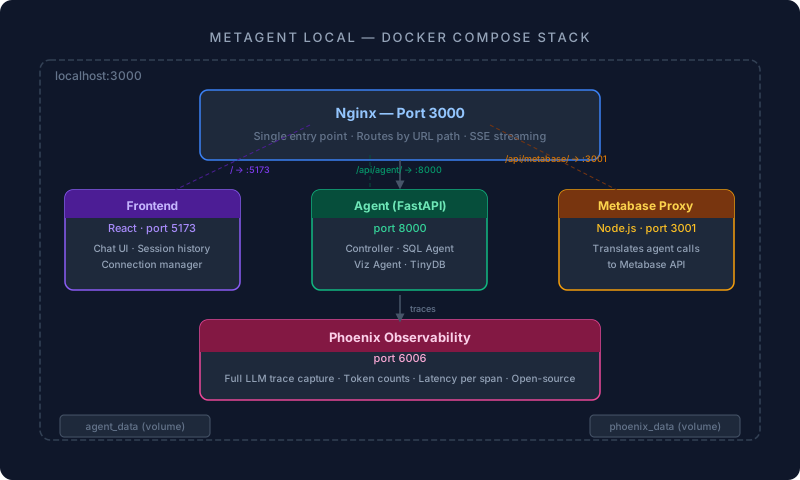
Four services, two named volumes (agent_data, phoenix_data), one Nginx config. The agent_data volume persists session history, connections, and AI configuration as local JSON files no external database required.
| Service | What it does |
|---|---|
| nginx | Single entry point. Routes traffic to the right service based on URL path. Handles SSE streaming with proxy_buffering off. |
| frontend | React dev server with hot-reload. The chat UI, connection manager, session history viewer, and observability dashboard. |
| agent | FastAPI application. The AI brain. Runs the Controller, SQL Agent, and Visualization Agent. Stores all state locally in TinyDB. |
| metabase | A lightweight Node.js proxy service that translates agent tool calls into Metabase API requests. You connect your databases through the UI. |
| phoenix | Arize Phoenix for LLM observability. Every prompt, tool call, and token count is traced here automatically. |
The Architecture: A Three-Agent Pipeline
The local agent isn't a single LLM call. It's a Controller-Worker architecture where a routing agent decides which specialist to invoke on each turn.
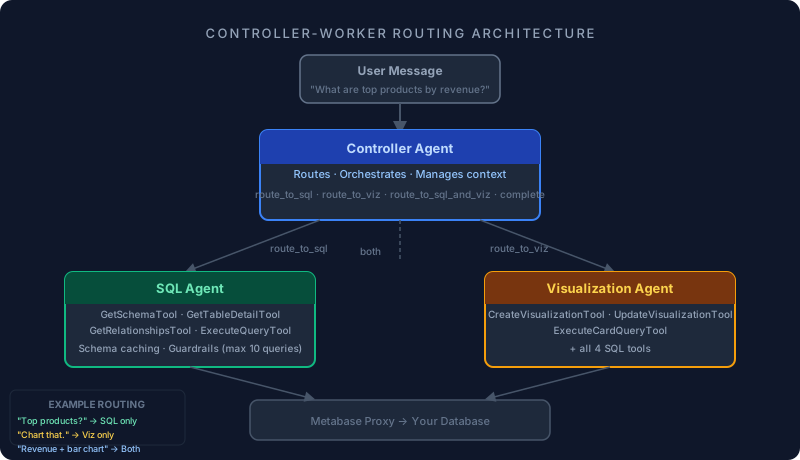
The Controller sits between the user and the specialist agents. It reads the user's message, considers the full session context, and decides the routing:
route_to_sqlJust needs data — delegates to SQL Agent
route_to_vizJust needs a chart from prior data — delegates to Viz Agent
route_to_sql_and_vizNeeds both, runs SQL first then Viz in sequence
completeConversational message, no specialist needed
This is a deliberate design choice. A single monolithic agent that does everything is slow, expensive, and hard to debug. Splitting responsibilities means each agent can be small, fast, and optimized for its one job.
Local Tools: The Agent's Full Toolkit
One of the most important aspects of the local version is that every tool runs against your own infrastructure. There are no external API calls except to the AI provider you choose.
The SQL Agent has four tools:
tools = [
    GetSchemaTool(),         # Lists all tables with database engine info
    GetTableDetailTool(),    # Gets fields, types, and field IDs for a specific table
    GetRelationshipsTool(),  # Infers foreign key relationships
    ExecuteQueryTool(),      # Runs SQL and returns up to 50 rows
]
The Visualization Agent adds three more:
tools = [
    CreateVisualizationTool(),   # Creates a Metabase card with chart type, axes, and filters
    UpdateVisualizationTool(),   # Modifies an existing card (SQL, settings, filters)
    ExecuteCardQueryTool(),      # Tests a card with optional filter parameters
    # + all four SQL tools above
]
Every tool call goes through the local Metabase proxy service a Node.js microservice that translates agent requests into Metabase API calls on your behalf. The agent never talks directly to your database. It talks to Metabase, which has its own permission model applied to every single request.
Smart schema caching
Once the agent fetches table details within a session, it caches them in SQLAgentMemory. If the user asks three consecutive questions about the orders table, only the first call hits the API. This cuts latency and reduces token usage significantly on multi-turn conversations.
if tool_name == "get_table_detail":
    cached = self.agent_memory.get_cached_schema(tool_args.get("tableId"))
    if cached:
        messages.append({"role": "tool", ..., "content": json.dumps(cached)})
        continue  # Skip the API call entirely
Query guardrails
The agent enforces a max_queries limit (default: 10) per turn and breaks after three consecutive errors. This prevents runaway loops and ensures the agent fails gracefully with an informative message rather than silently retrying forever.
Choose Any AI Provider
This is one of the most important differences from the cloud version: you are not locked into a single AI provider.
The local stack ships with a unified adapter layer that supports three providers out of the box:
| Provider | Available Models |
|---|---|
| OpenAI | Fetched dynamically from your account (gpt-4.1, gpt-4.1-mini, etc.) |
| Anthropic | claude-opus-4-6, claude-sonnet-4-6, claude-haiku-4-5, claude-3-5-sonnet, and more |
| gemini-2.0-flash, gemini-2.0-flash-lite, gemini-1.5-pro, gemini-1.5-flash, and more |
You select your provider and model from the UI. API keys are stored locally, encrypted on your agent_data volume. You can switch providers mid-deployment without restarting the stack.
# ai/adapters.py — unified interface
class OpenAIAdapter:     ...  # Tools as JSON Schema, strict validation
class AnthropicAdapter:  ...  # Converts to Anthropic tool_use format
class GoogleAdapter:     ...  # Uses OpenAI-compatible endpoint
Each adapter normalizes the provider's tool-calling format so the agent logic stays identical regardless of which model is running underneath. You pick gpt-4.1 for accuracy, gemini-2.0-flash for speed, or claude-sonnet for reasoning the agents don't care.
And if you want to point the stack at a locally-hosted model via an OpenAI-compatible endpoint (Ollama, LM Studio, vLLM), you can do that too configure your local endpoint as the OpenAI base URL and the adapter handles the rest.
Memory That Learns From Your Business
One of the core principles behind MetAgent Local is that the agent should get smarter the more your team uses it. Not just smarter in general — smarter about your data model, your business terminology, and your specific query patterns.
The system has a three-layer memory architecture:
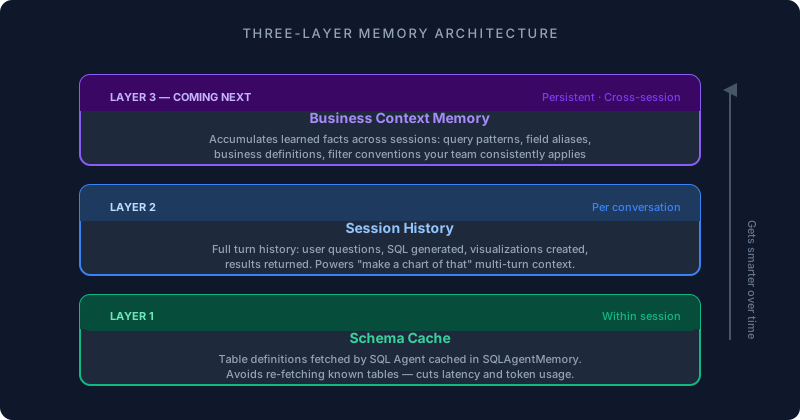
Layer 1: Schema cache
Within a session, table definitions fetched by the SQL Agent are cached in SQLAgentMemory. The agent learns the structure of your data model as the conversation progresses and doesn't re-fetch what it already knows.
Layer 2: Session memory
Every conversation is a session. Within a session, the Controller tracks the full turn history: what the user asked, what SQL was generated, what visualization was created, and what the results were. This is what makes "make a chart of that" work — the Controller has the prior turn's context and knows exactly what "that" refers to.
Layer 3: Business context memory coming next
The next layer we're building is persistent business context — a knowledge store that accumulates learned facts about your data model across sessions:
- →"The
orderstable usesstatus = 'closed'to mean completed orders, notstatus = 'completed'." - →"Revenue queries should always filter
channel != 'internal'to exclude test transactions." - →"When the user asks about 'active customers', they mean accounts with at least one order in the last 90 days."
These are the kinds of things that take a new analyst weeks to learn. MetAgent Local will accumulate them automatically from your team's usage patterns.
Monitoring and Performance: Full Local Observability
When you self-host, you don't have CloudWatch or Datadog. MetAgent Local gives you production-quality observability at zero additional cost.
Phoenix tracing (built-in)
Every LLM call in the system is automatically traced via Arize Phoenix — an open-source LLM observability platform that starts as part of the Compose stack. No account, no API key, no configuration.
def _init_phoenix():
    from phoenix.otel import register
    from openinference.instrumentation.openai import OpenAIInstrumentor
    register(project_name="MetAgent", verbose=False)
    OpenAIInstrumentor().instrument()
Phoenix captures automatically:
- Every prompt sent to the LLM, with full message history
- Every tool call with its exact inputs and outputs
- Token counts per call and per session
- Latency per span (tool calls, agent loops, full requests)
- Error states and stack traces
- The full span tree: Controller → SQL Agent → individual tool calls
You access it at localhost:6006. The frontend also surfaces session-level trace data directly in the chat UI, so you can inspect what the agent did without leaving the interface.
Session history API
Beyond tracing, the agent exposes a full session history API:
| GET /sessions | Recent sessions with turn counts and timing |
| GET /sessions/{session_id} | Full conversation history with SQL queries, responses, and visualization IDs |
| GET /traces | Phoenix trace data for any session |
| GET /traces/{session_id} | Detailed span tree for a specific turn |
LangSmith (optional)
If your team already uses LangSmith, you can enable it alongside Phoenix:
LANGSMITH_ENABLED=true
LANGSMITH_API_KEY=your-key
LANGSMITH_PROJECT=MetAgent
Both tracers run simultaneously — Phoenix for local visibility, LangSmith for your existing monitoring dashboards.
Security Model: How Permissions Work
MetAgent Local does not manage permissions. Metabase does.
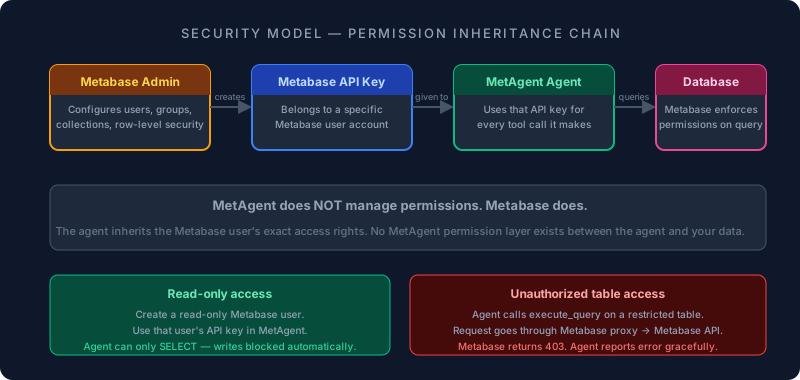
Here's the flow:
- You set up Metabase. You create users, groups, collections, and row-level security exactly as you would without MetAgent.
- You give MetAgent a Metabase API key. That key has the permissions of the Metabase user it belongs to.
- When the SQL Agent calls
execute_query, it sends the request through the local Metabase proxy service, which callsPOST /api/dataseton your Metabase instance with that API key. - If that Metabase user doesn't have access to a table, the query fails. Metabase's permission model is the enforcement layer — MetAgent is just a caller.
There is no MetAgent permission layer between the agent and your data. Just Metabase's built-in, battle-tested access controls applied to every single request.
If you want to restrict the agent to read-only access, create a read-only Metabase user and use that API key. The agent inherits everything automatically.
Conclusion
MetAgent Local proves that a multi-agent analytics system doesn't require a managed cloud service to work well. Four Docker containers, one AI provider key of your choice, and a Metabase instance is enough to give a team natural-language access to their data — with full local observability, business context memory that learns from usage, and Metabase's permission model enforcing access control at every query.
For teams that need data sovereignty, this is the path. The intelligence is the same. The infrastructure, the tools, and the data are yours.
Want MetAgent for your company?
Whether you want to run it yourself or have us set it up and manage it — self-hosted or as a managed service — we can find the right setup for your infrastructure and your data. Visit metagent.app to learn more, or book a call below.
Book a free call →Previous articles in this series:
- Building an AI-Powered SQL Assistant with Metabase
- Building the Analytics Agent on Metabase: A Progress Report
- AI Agent Evaluation: How We Improved MetaAgent for Faster and More Accurate SQL Generation
- Beyond Agentic: Building a Human-in-the-Loop SQL Assistant That Scales
- From SQL to Shared Insights: Building a Multi-Agent Analytics System with Metabase and Slack